

Most businesses don’t lose money because they lack leads, talent, or ambition. They lose money because work moves through the company like sludge. People chase info, approvals stall output, and “quick tasks” quietly steal the week.
This Free Automation Blueprint gives you a practical way to audit your own processes, diagnose inefficiency, name problems you didn’t know you had, quantify the impact, and build a prioritized automation backlog you can implement when ready.
Automation won’t stay optional. Your competitors will build systems that run faster with fewer people. If you keep running manual workflows, you will pay more for the same outcomes.
How to Use This Blueprint
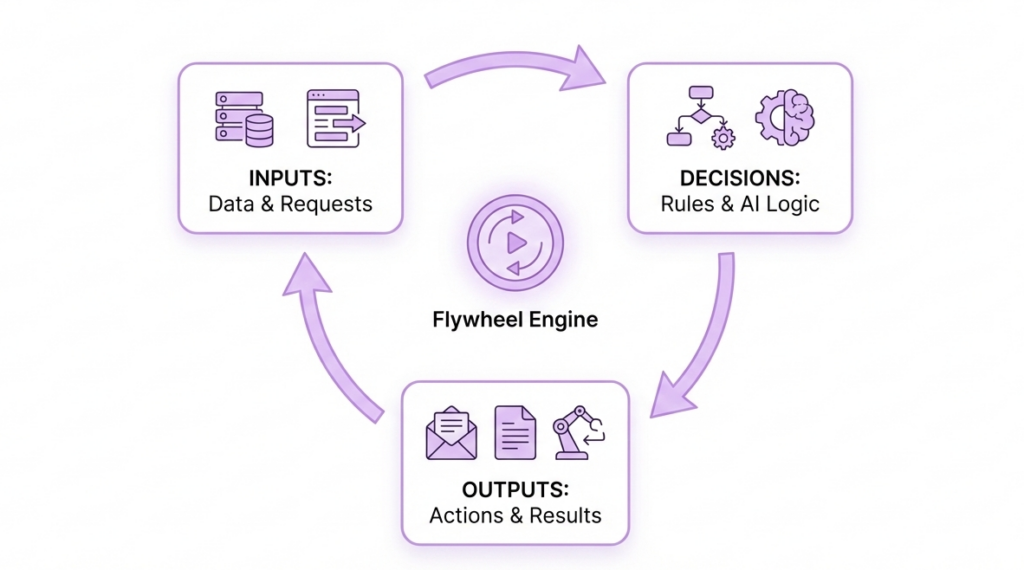
This resource will feel like a flywheel in three parts:
- Learn how automation works
- Understand where you stand
- Implement when ready
If you do the steps below honestly, you will finish with:
- A clear map of your core workflows
- A diagnosis of your biggest inefficiencies
- A simple model to quantify waste in time and money
- A ranked list of automations with the highest ROI
Part 1: Learn How Automation Works
Automate flow, not chaos
Automation amplifies your current operations. If your process runs messy, automation scales the mess. You need clarity before you need tooling.
Automate when:
- A task repeats with similar inputs
- A step follows clear rules
- A handoff causes delays or errors
- You can define “done” without debate
Avoid automation when:
- You don’t understand the process
- Inputs arrive inconsistent and incomplete
- The step requires high-stakes judgment without guardrails
The five automation levers
Most teams “use AI” and still drown. They never build real systems. Use these levers instead:
- Triggers: events that start work (form submit, payment received, contract signed)
- Routing: assign ownership and move work to the right person automatically
- Data sync: keep tools aligned so people stop copy-pasting
- Generation: produce drafts (emails, reports, summaries) from structured inputs
- Monitoring: catch failures before customers notice
If you pull all five levers, you build a machine. If you pull one lever, you buy a shiny tool and keep the chaos.
Part 2: Understand Where You Stand
Step 1. Map your real work
Pick three core workflows that drive revenue and delivery, such as:
- Lead → close → onboarding
- Order → delivery → follow-up
- Support ticket → resolution → retention
For each workflow, write the steps in plain language:
- Start event: what triggers the workflow
- Steps: what happens, in order
- Handoffs: who passes it to whom
- Systems used: tools, docs, spreadsheets
- Definition of done: what “complete” means
Don’t overthink it. You want the truth, not the “ideal process.”
Step 2. Run the bottleneck score (0–3 self-audit)
Score each statement from 0 (never) to 3 (constantly):
- Work piles up in one place.
- Approvals delay delivery.
- One person holds critical knowledge.
- We duplicate data across tools.
- We lose time to “quick tasks.”
- Clients ask for updates and we scramble.
- We redo work often.
- We rely on Slack and inboxes for workflow.
- We can’t predict timelines reliably.
- A 30% workload increase would cause chaos.
Interpretation
- 0–9: You run decent ops, but you still leak time and margin.
- 10–14: You run hidden bottlenecks; growth will hurt.
- 15+: You run confirmed process bottlenecks; automation will pay back fast.

If you score 15+, don’t hire your way out. Hiring adds communication overhead and multiplies failure points. Fix flow first.
Step 3. Diagnose the inefficiency type
Most teams call the issue “too much work.” That diagnosis stays useless. Pick the top two patterns that describe your business.
A) Human middleware
Your people act as the integration layer between tools.
You’ll spot it when you see copy/paste, CSV exports, and manual updates.
- Symptoms: “Can you update the CRM?” “Just export it and I’ll fix it.”
- Hidden cost: errors, missed follow-up, inconsistent reporting
B) Approval choke points
A leader becomes a gatekeeper in the name of “quality.”
Quality drops anyway because delays create chaos.
- Symptoms: “Waiting for review” everywhere
- Hidden cost: lead loss, delayed delivery, team frustration
C) Intake chaos
Work arrives incomplete, so everyone plays detective.
You waste time chasing info instead of producing outcomes.
- Symptoms: “Just need one more thing” messages
- Hidden cost: stalled projects, endless DMs, rework
D) Rework loops
Unclear acceptance criteria create revisions and second-guessing.
- Symptoms: deliverable ping-pong
- Hidden cost: margin collapse and missed deadlines
E) Invisible queues
Work hides in inboxes and chats, so you run meetings to discover reality.
- Symptoms: “What’s the status?” becomes a daily ritual
- Hidden cost: no forecasting, no accountability, low throughput
Pick two. If you pick five, you’re avoiding the truth.
Step 4. Quantify the impact
Automation becomes inevitable once you price the inefficiency. Use this model.
1) Time drain
For each workflow, estimate:
- repeated admin minutes per transaction
- transactions per week
- blended hourly cost
Formula
- Weekly hours wasted = (minutes wasted × transactions) ÷ 60
- Monthly cost = weekly hours × 4.3 × hourly cost
Example:
- 12 minutes wasted × 80 transactions = 960 minutes
- 960 ÷ 60 = 16 hours/week
- 16 × 4.3 = 68.8 hours/month
- At $40/hr = $2,752/month burned on one workflow
2) Error + rework cost
Track:
- % of cases needing rework
- average rework time per case
- hourly cost
Even a 10% rework rate turns vicious at scale.
3) Cost of delay
Delay hits revenue and cashflow hard:
- slow lead follow-up lowers close rates
- late invoices extend time-to-cash
- slow delivery increases churn
Ask:
- “What does a one-day delay cost us?”
- “How often do we delay per month?”
You don’t need perfect data. You need believable numbers that force action.
Want this to work for you?
Book a free audit.
Part 3: Implement When Ready
Step 6. Build your automation backlog
List 10–20 automation opportunities. Then score each 1–5:
- Frequency: how often it happens
- Time saved: minutes saved per instance
- Error reduction: how much risk drops
- Revenue impact: speed-to-lead, speed-to-cash, retention
- Risk: compliance and customer-facing mistakes
- Effort: build complexity
Priority rule
Start with: high frequency + low risk + low effort + clear time drain.
Don’t start with the “cool” automation. Start with the one that stops daily bleeding.
Step 7. Pick your first three automations
Most teams automate random parts and call it transformation. Use this sequence instead:
- Intake standardization
- forms, required fields, templates, naming conventions
- result: clean inputs that automation can trust
- Handoff automation
- trigger tasks, assign owners, create checklists, notify stakeholders
- result: work moves without chasing
- Reporting + monitoring
- dashboards, status updates, failure alerts
- result: visibility and control
This sequence stops firefighting and builds stability fast.
Step 8. Your North Star – the 30% stress test
This final stress test style question is commonly used in constraint analysis, as described in The Goal by Eliyahu M. Goldratt, to identify the weakest points in a system before scaling. Answer this in writing:
If workload increased by 30%, what would break first?
Then follow through:
- protect that step
- remove manual handoffs around it
- add monitoring so failures can’t hide
If you can’t pass the 30% test, you don’t run a scalable business. You run a fragile one.
Quick-Start Checklist
- Choose 3 workflows and map the real steps
- Score bottlenecks (0–30)
- Name your top 2 inefficiency types
- Quantify waste (time, rework, delay)
- Build and score your backlog
- Implement the first 3 automations in sequence
The blunt truth
If your business relies on people to remember, chase, and copy-paste, you don’t run operations. You run a hope-based system.
Hope doesn’t scale. Systems do.
Torm Erik Raudvee
18.02.2026

Book a Free Automation Audit
Begin your journey with us now. Unlock the potential of your business with our innovative solutions designed to boost your success and propel you towards your goals.