

Client Overview
During an automation audit, we determined the most significant time sink for a client. A service business with a shared inbox was losing time and focus to email triage and repetitive replies. The inbox mixed genuine inquiries (that needed fast, accurate responses) with newsletters, automated notifications, and marketing emails that created noise.
How the Client Approached Prosperus
The client reached out after two operational symptoms became hard to ignore:
- Manual inbox scanning made response times inconsistent.
- At first glance, the team mistook some legitimate inquiries for low-priority messages and replied later than they should have.
They wanted an AI email assistant, but with a strict requirement: no automated sending without human review. The goal was speed and consistency without sacrificing control.
The Problem: Email Triage and Drafting Were Bottlenecks
Before implementation, the workflow looked like this:
- Open inbox
- Decide what needs a reply
- Draft response from scratch
- Send and hope nothing was missed
This created two predictable failure modes:
- Context switching and interruptions throughout the day
- Variable quality and tone, depending on who replied and how busy they were
The Solution: AI Drafting With Human Approval
We implemented a two-stage workflow that mirrors a proven “human in the loop” email response pattern:
- Receive emails
- Use AI to determine whether an email needs a reply
- Draft a professional response with AI
- Request human approval before anything is sent
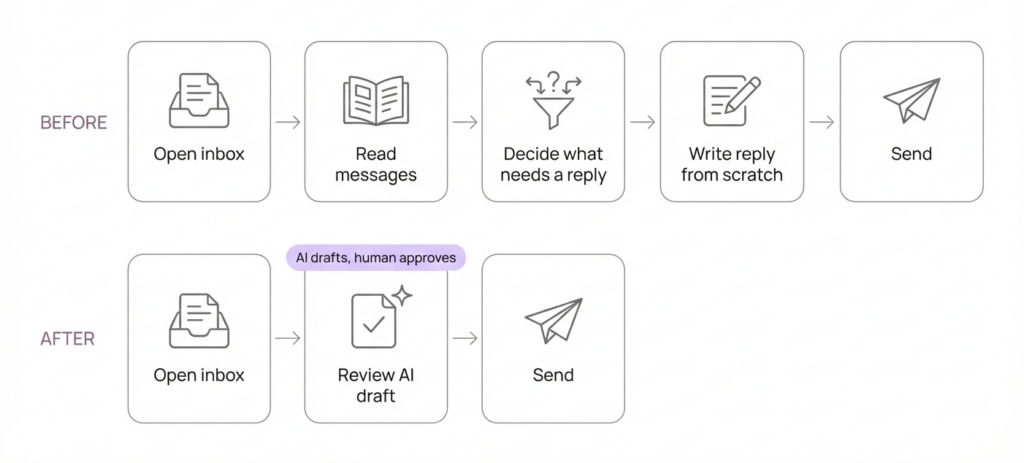
Why Human-in-the-Loop Was Non-Negotiable
The workflow is designed so AI accelerates triage and drafting, while a human remains accountable for final approval and sending. This reduces the risk of replying to automated emails, misreading intent, or sending inaccurate information.
Automation Flow Breakdown
1) Intake: Email Trigger (IMAP)
- Watches the mailbox and ingests the email subject and body text into n8n.
- Keeps the pipeline lightweight by focusing on what the AI needs to classify and draft.
2) AI Triage: “Assess if message needs a reply”
- Prompt includes the subject and message content.
- The model returns only a structured response:
{ "needsReply": true | false } - Rule-based guidance in the prompt suppresses noise: marketing, delivery confirmations, and automated system emails do not require a response.
This stage is run deterministically (temperature 0) to keep decisions stable and auditable.
3) Gate: “If Needs Reply”
- If
needsReply = true, proceed to drafting. - If
needsReply = false, stop and do nothing. No distractions, no drafts.
4) AI Draft: “Message a model”
- Drafts a reply in a professional, business-casual tone.
- Avoids fabrication and uses placeholders where needed.
- Responds in the same language as the inbound email.
5) Human Review Output
You have two review-friendly output options, both consistent with human-approval-first design:
- Gmail Draft creation so the user can review and send from the existing thread.
- Internal approval email containing the proposed reply for quick review and manual send.
AI drafts, then a human approves and sends the final reply.
Implementation Highlights That Matter in Production
Structured outputs for triage
Using a strict schema for needsReply prevents the automation from giving ambiguous outputs and reduces routing errors.
Minimal, explicit prompting for drafting
Clear constraints improve reliability: no special formatting, no invented facts, and language mirroring the inbound email.
Auditability
Each step produces artifacts the team can review: classification output plus the draft response.
Results
- Time saved on triage: from ~60 minutes/day to ~25 minutes/day (Microsoft)
- Time saved per reply draft: from ~8 minutes/email to ~3 minutes/email (Talkdesk)
- Median response time improvement: from ~16 hours to ~3 hours. (Superhuman Blog)
- Quality consistency: 30% to 50% fewer major rewrites and 20% to 35% fewer missed-question follow-ups.
The values are estimates based on industry standards.
Want this workflow for your inbox?
Book a short discovery call.
Why This Email Automation Converts
Faster responses without losing control
Prospects want proof that automation improves speed while keeping humans in charge of outbound communication.
Consistency in tone and structure
The workflow enforces a repeatable reply style and reduces variability across team members.
Reduced cognitive load
The team spends less time deciding what matters and more time handling real conversations.
FAQ
How does an AI email assistant avoid replying to newsletters and automated emails?
It runs a triage step that classifies messages using explicit rules and returns a structured decision before drafting.
Does this workflow send emails automatically?
Not by default. It is designed for human approval first, typically via drafts or internal approval steps, before any external reply is sent.
Can it reply in multiple languages?
Yes. The drafting prompt instructs the model to respond in the same language as the inbound email.
What inboxes does it support?
Any inbox accessible via IMAP can be used for intake, and outbound can be handled through drafts or SMTP-based sending depending on the team’s setup.
Torm Erik Raudvee
28.01.2026

Send us your current inbox flow and we will propose an implementation plan
Begin your journey with us now. Unlock the potential of your business with our innovative solutions designed to boost your success and propel you towards your goals.